Many people start an ecommerce business by creating a store on Shopify. They install the latest apps, upload their high-quality images, and don’t give it a second thought.
When they start advertising, a lot of them wonder: “Why aren’t customers converting on my site? Why do they just leave? Are my products or prices the problem? Or is it my target audience?”
These could all be contributing factors, but the most overlooked issue is page speed.
According to Google, every second of delay in a mobile page load can result in conversions falling by up to 20%! That’s why page speed should be one of the first things you look at when optimizing your Shopify website.
How to Know If You Have Speed Issues
There are a few things you can do to assess your ecom site for speed issues:
- Look at your Google Analytics reports. In Behavior > Site Speed > Overview, you’ll find your overall page-load time as well as speed suggestions for each page that needs to be optimized.
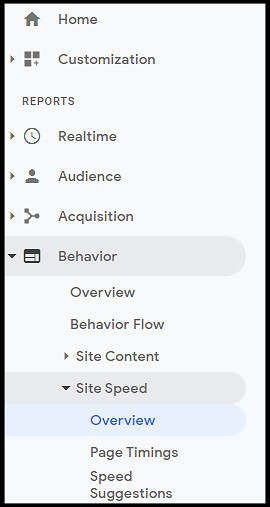
How to find the report
- Look at bounce rate. A very high bounce rate on your landing pages could be a big indicator that your pages aren’t loading fast enough (although there could be other reasons).
- Use tools to assess your website’s speed performance. I recommend that you use a few tools, each of which measures your site in a different way. That will give you a good picture of problem areas.
Here are some tools that I recommend:
- Google PageSpeed Insights measures your site’s speed on both desktop and mobile. Look at mobile first since, these days, most of your customers are using mobile devices.
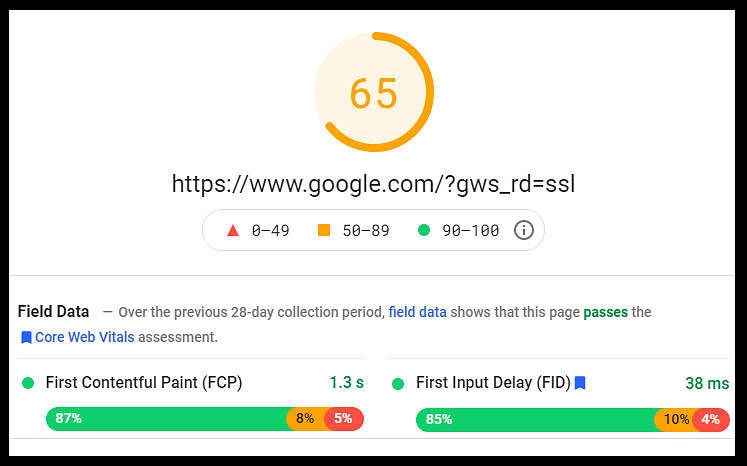
Google PageSpeed Insights results for Google.com
- GTmetrix provides a score from A to F and merges data from YSlow and Google PageSpeed Insights. It also produces a performance report that highlights specific problems on your site.
- Make Pingdom the final test on your website. It provides you with a waterfall report on what’s happening behind the scenes in terms of page load. This waterfall report is great if you have developers because it shows them where to look.
After reviewing these tests and data, you’ll have a greater understanding of where your website is in terms of page speed.
Tip: As a rule of thumb, Build Grow Scale considers a website load time of under 3 seconds to be good.
How to Balance Customer Experience and Page Load
Before I go into easy ways of improving site speed, I need to talk about the issue of balancing apps. While site speed is very important, making sure the customer experience is enjoyable, is, in a sense, equally important.
Here’s an example: You install an app for a customer service chat box. However, the JavaScript behind it is very heavy and hasn’t been optimized on the app developer’s side. This can cause your Shopify site load time to increase. However, a lot of customers use this customer service chat, and it increases your sales by 10%.
So, do you keep the chat or optimize for page speed?
There are a few options:
- You can try a different app with less JavaScript, which can improve page speed.
- You can keep the chat as is since it’s increased your sales by 10%.
This is why A/B testing your changes is so important. It lets you see the pros and cons of each option. Sure, page speed might go up with the second option, but if you’re getting more bottom-line revenue, then it’s a win.
Easy Ways to Fix Your Site Speed Without Using a Developer
Having a developer look at a site speed waterfall report and fixing issues is wonderful, but some Shopify owners don’t have the luxury of hiring one. Here are some ways you can improve your site speed now without being a coding genius.
Upgrade your web hosting
This really isn’t an issue for Shopify ecommerce stores because Shopify’s web hosting is super fast and designed specifically for ecommerce stores. But if you aren’t on Shopify, this is an important step you can take to improve your site speed. Make sure your website isn’t sharing hosting with other websites on a server. Not sharing dramatically increases your site speed and is essential for ecommerce stores.
Don’t be cheap on your hosting—make sure you’re getting the best service.

Web servers
Use a content-delivery network
Again, this isn’t a Shopify issue because Shopify has its own content-delivery network (CDN). A CDN is essentially a family of servers located across the globe. It delivers content to customers via their closest server to improve speed. If you’re a non-Shopify ecommerce website, then you should be using a CDN.
Host videos offsite
If you have high-quality product videos on your product page or homepage, don’t host them directly on your site. This can cause major load times as customers try to watch your videos. It’s better to have these hosted on YouTube, Vimeo, or another video website and have the hosted videos embedded into your website.
Consider a new premium theme
You get what you pay for! If you’re using a free theme from Shopify, make sure that you test the page speed before you make any changes. Usually, premium themes have well-thought-out optimization of page speed, so make sure you read reviews about the theme you select and ask questions before purchasing one.
Note: Build Grow Scale has already optimized a theme that you can get by joining our Ecom Insider program. Check it out.

Looking for the perfect theme at Shopify
Remove unused apps
Cutting apps that aren’t being used can increase your page speed by a lot. I often ask store owners to go through their apps and list the ones they aren’t using so that we can remove them. The JavaScript in unused apps on your Shopify store can take time to load, increasing the time of the full-page load.
When it comes to using apps that are big on load times, make sure you weigh or test the pros and cons of keeping the app. Sometimes it’s better to keep an app that increases your revenue even if it also decreases page speed. Always look for options within the Shopify app store as some are optimized better than others.
Compress or resize images
Shopify compresses images to the best of its ability but it’s great practice to make sure all the images and files you upload to Shopify are already compressed and resized correctly.
Tip: One of our top revenue experts at Build Grow Scale goes into more detail about image optimization on Shopify.
Minify coding and lazy loading
To minify coding is to remove all the unused markup language in the code to reduce the size of the file. To lazy load is to allow a page to load all the onscreen images or JavaScript coding first–the things that a customer will need–and then load all other images or other items that are off screen.
There are tools for this in the Shopify app store. Find one that’s the best fit for your store.
Remove unnecessary redirects
The more 404-page errors and redirects there are, the longer it takes the server to find and load the correct page. Removing unnecessary redirects will improve your page speed and your search engine ranking.
For example, a redirect chain (a page that redirects to a page that redirects to another page) can drastically increase your page load time and ruin your search engine results.
404-error page from Google
If All Else Fails
If you have the money, then I strongly suggest hiring a developer to optimize your website for page speed. It’s money well spent and will improve your conversions and search engine optimization in the long run.
After the Optimizations
You may think that after you optimize in the ways just described, you’re set. But as you add elements to your site, please keep in mind that you might have to optimize again, perhaps regularly.
Also keep in mind the role of A/B testing. It’s vital to your ecommerce journey because it helps you find the best optimizations for your ecom business.
We at Build Grow Scale wish you good luck!
Note: You can find out more about our website-optimization programs here.
Resources
Google. (n.d.). Google PageSpeed Insights: Make your web pages fast on all devices. Think with Google.
SOASTA. (2017). The state of online retail performance [from “Think with Google: Mobile page-speed conversion data”].